Signal shuts operating-system AI assistants out of its chats – screenshot blocking on iOS 27, automatic screen security on Android, and what is still left open
A blank white screen with the Signal logo instead of a screenshot: on iOS 27 and Android, Signal hides chats from AI assistants. Data stored in the file system may still be reachable, though. What the move protects, and what it does not – with sources.
End-to-end encryption protects what travels between two devices. But if an AI assistant built into the operating system reads a message off the screen, encryption no longer helps. Signal has responded to that gap: according to Meredith Whittaker's blog post of 20 November 2026, the app now shuts AI assistants built into phones out of its chats. Based on that post, The Register's article of 20 November and Help Net Security's report of 23 November, this article goes through what has changed. It is not a product recommendation.
| Fact sheet | |
|---|---|
| Announcement | 20 November 2026, Signal blog, by Meredith Whittaker |
| iOS 27 | in-app screenshot blocking, "Block Siri AI" setting |
| Android | "Screen security" switches on automatically when the app detects an AI assistant reading the screen |
| Windows 11 | "Screen security" on by default against Recall since May 2025 |
| macOS 27 | no reliable blocking; Signal points to Siri's "Excluded Apps" list |
| Can it be turned off? | yes, in Signal's settings, with a warning |
| Remaining gap | data stored in the file system |
Sources: Signal, 20 Nov, The Register, 20 Nov, Help Net Security, 23 Nov, Signal, 21 May 2025.
What the problem is
Some AI assistants "see" apps by taking a screenshot and then reading the content with optical character recognition (OCR), as The Register describes it. Signal's post names Apple's Siri AI, Google's Gemini integration on Android, and Meta's agent Muse, which, according to Help Net Security, can reach app data through accessibility permissions granted during setup. Whittaker calls the current integration of AI into operating systems an "existential threat" to privacy at the application layer.
What the feature does on each platform
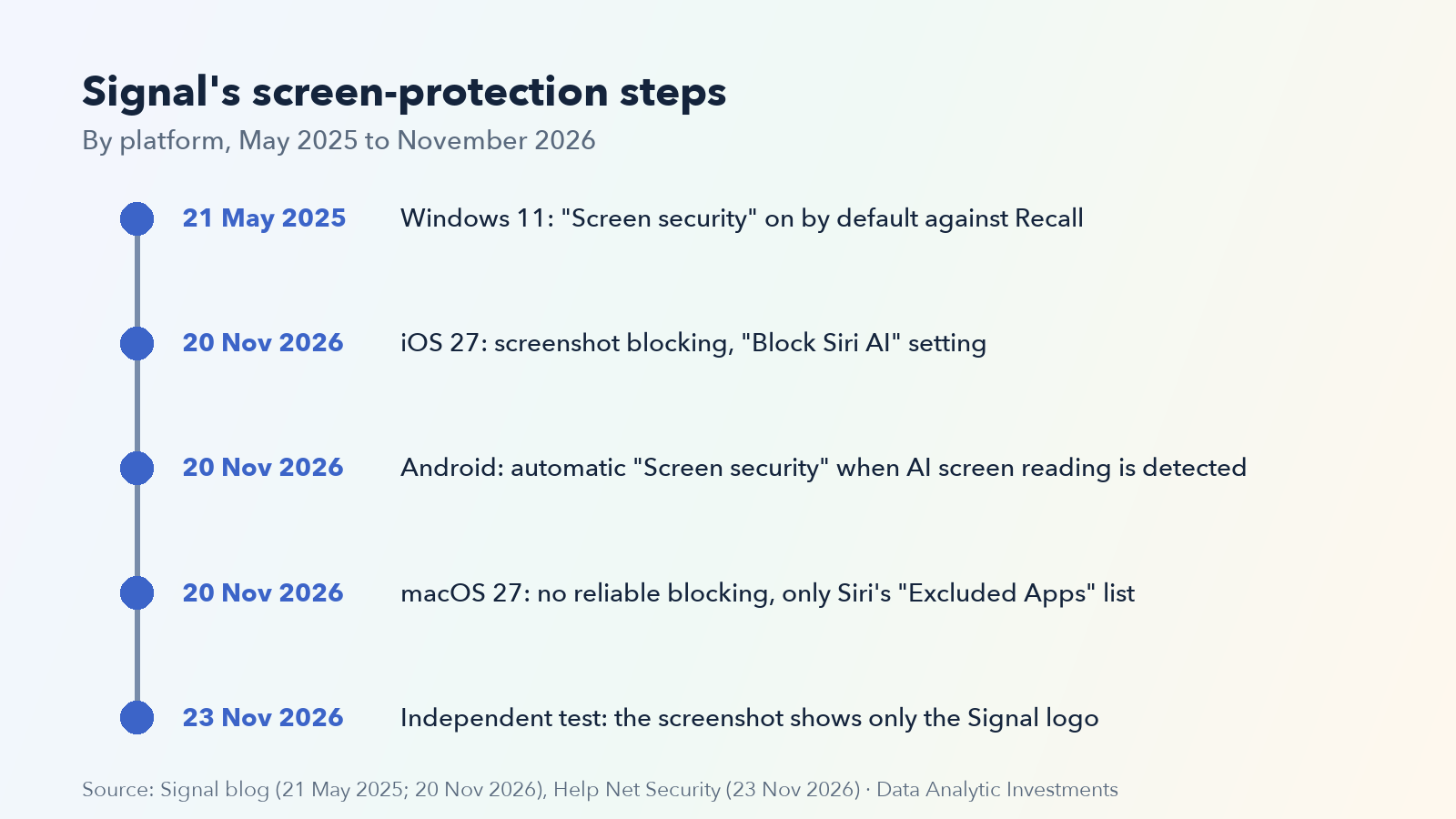
iOS 27. Signal blocks screenshots inside the app; the setting is called "Block Siri AI". The Help Net Security author tried it: the screenshot showed only the Signal logo on a white background, with no messages.
Android. Many vendor builds of Android offer no reliable way to detect a screenshot attempt, so Signal watches for an AI assistant trying to read the screen and then switches on "Screen security" automatically. Signal itself calls this approach incomplete.
Windows 11. Here the step is not new: on 21 May 2025 Signal turned "Screen security" on by default against Microsoft Recall, which takes a screenshot every few seconds and makes it searchable. Signal uses the window's DRM flag for this because, according to the post, Microsoft offered no other tool.
macOS 27. Signal cannot reliably block screenshots here, because Apple provides no documented tool for it. The post names the "Excluded Apps" list under System Settings › Siri as the only available option.
A discrepancy between sources: is it on by default?
According to The Register, the iOS and Android protection is on by default. Signal's post does not state the iOS default in its text – only a screenshot shows it switched on – and for Android it describes automatic activation when AI screen reading is detected. Help Net Security does not give an iOS default either. The exact behaviour depends on the current app version. All three sources agree that the protection can be turned off, and that Signal warns users that their own and their contacts' messages may then become available to assistants.
What is still left open
Signal states plainly that blocking screenshots does not close every route: an AI agent could also retrieve content stored on the device through the file system. That is why the post asks Apple, Google and Microsoft for two things:
- an easy, documented way for apps to opt out of AI access – screen, files, notifications, APIs;
- better technical documentation on how AI agents access and process data.
According to Signal, confidential computing is not a complete solution, because the platform provider still decides which guarantees to offer. The Register also reports that the public beta of macOS 27.3 brings more granular permission controls for Full Disk Access; this article mentions that only as the outlet's report and has not verified it independently.
5 things many people don't know
- Encryption protects transport, not the screen. Whatever is readable on the display can also be reached by an assistant that reads the screen (this article's own knowledge, consistent with Signal's reasoning).
- The Windows block has been in place for a year and a half. Signal switched it on against Recall in May 2025.
- On Android, the app watches for the assistant, not the screenshot. Many vendor builds cannot reliably detect a screenshot attempt.
- There is no reliable protection on macOS. Apple provides no documented tool for it.
- A blocked screenshot does not mean the data is out of reach. Content stored in the file system may be read another way.
Summary
- Announcement: 20 November 2026, Signal blog.
- iOS 27 and Android: chats hidden from AI assistants' screen reading; can be turned off.
- Windows 11: blocking against Recall since May 2025.
- macOS: no reliable blocking.
- Open question: file-system access; Signal asks operating-system vendors for a documented opt-out.
Related reading: Hash, encryption and digital signature – three different tools · Blog archive.
Educational content. Not a product recommendation and not advice. This article describes Signal's public blog posts and press sources; this article's own knowledge is marked as such. Data Analytic Investments is not affiliated with the Signal Foundation, Apple, Google, Microsoft, Meta or the portals cited; names are used for identification only.
Continue on DAI
Explore Topics
Written by
Data Analytic Investments
Content creator and writer sharing insights and stories.